.webp)
Stop lighting your CAC on fire. Learn to fix the technical gaps, SPF/DKIM/DMARC, and domain warming to keep your B2B SaaS emails out of the spam folder - and out of the trash.
What you'll learn:
- Why cold emails fail: spam filters vs. ignored emails - and how to fix both
- How to set up SPF, DKIM, and DMARC correctly
- How domain warming works and how long it actually takes
- What damages sender reputation and how to protect it
- How to write copy that gets read, not deleted
- How to monitor deliverability before results collapse
Email deliverability is one of the most misunderstood areas of cold outreach. Teams set up their sequences, launch campaigns, and then wonder why open rates are low and replies are scarce. Often the problem isn't the copy - it's that the emails never reached the inbox.
But "emails not working" has two completely different root causes.
The first: your email lands in spam. That's a technical problem.
The second: your email reaches the inbox and still gets deleted in two seconds. That's a copy and relevance problem.
This guide covers both. Start with the technical foundation - because if your emails don't reach the inbox, nothing else matters. Then fix the message itself.
What Is Email Deliverability?
Email deliverability refers to the ability of an email to reach the recipient's inbox, as opposed to being caught by spam filters, bounced, or silently discarded.
It's distinct from email delivery, which simply means the server accepted the message. You can have 100% delivery and 40% inbox placement if half your emails are going to spam.
Deliverability is determined by a combination of factors:
- Technical authentication (SPF, DKIM, DMARC)
- Sender reputation (domain and IP history)
- Content quality (spam trigger words, link patterns, formatting)
- Engagement signals (opens, replies, positive behavior)
- List quality (bounce rates, spam complaints)
Why Deliverability Matters in Cold Outreach
Cold email campaigns send to people who have no prior relationship with you. That means you're starting with zero trust from inbox providers. Every technical shortcut and quality issue compounds.
A campaign with 60% inbox placement is wasting nearly half your outreach budget and contact list. A domain with a damaged reputation affects not just your cold emails but also your transactional emails, marketing emails, and customer communications.
Fixing deliverability issues retroactively is significantly harder than setting things up correctly from the start.
The Technical Foundation: Authentication Records
Authentication records tell inbox providers that your emails are legitimate and haven't been spoofed. Without all three in place, inbox providers have no reason to trust you.
SPF (Sender Policy Framework)
SPF specifies which mail servers are authorized to send email on behalf of your domain. When a server receives an email from your domain, it checks whether the sending server is on your approved list.
Without SPF, anyone can send an email claiming to be from your domain. With SPF misconfigured, your legitimate emails may fail verification checks.
Setup: add a TXT record to your domain's DNS. Most cold email platforms provide the exact record to add.
DKIM (DomainKeys Identified Mail)
DKIM adds a cryptographic signature to each email, which the receiving server can verify against a public key stored in your DNS. This confirms the email hasn't been tampered with in transit and that it genuinely originated from your domain.
Setup: your sending platform generates a DKIM key pair. You add the public key to your DNS as a TXT record.
DMARC (Domain-based Message Authentication, Reporting & Conformance)
DMARC defines what happens when SPF or DKIM checks fail - whether to reject the message, quarantine it, or deliver it anyway. It also enables reporting, so you can see who is sending email on behalf of your domain.
The correct progression:
- Start with a policy of none (monitoring only) to collect data on your sending sources
- Once you've confirmed all legitimate sending is properly authenticated, move to quarantine
- Move to reject only when you're confident no legitimate email will be blocked
The most common mistake is setting DMARC to none and never revisiting it. That means you have no enforcement and no insight into abuse. Treat none as a temporary state, not a final setting.
Use a Separate Domain for Cold Outreach
Never run cold email from your main company domain.
If you send cold email from yourcompany.com and something goes wrong - spam complaints, poor engagement, inbox placement issues - you risk damaging the domain that powers all your marketing, customer comms, and sales follow-ups. The cost of registering an additional domain is trivial compared to that risk.
Here's what that risk looks like in practice.
We recently worked with a client whose SPF, DKIM, and DMARC were configured perfectly - the technical foundation was clean. What killed them was the sending strategy: 8-email sequences, aggressive sales language, and mass-contacting personal @gmail.com and @yahoo.com addresses. Their bounce rate climbed to 40%. On January 9, 2026, Google flagged the entire sending infrastructure as spam, blocked the accounts, and the domains landed on blacklists like SURBL multi.
We rebuilt from scratch - 8 new domains, 3 mailboxes each, around 200 PLN in domain costs and two hours of setup. It was faster than fighting to delist the old domains and prove to every blacklist operator that the accounts weren't being used for spam. But here's the real point: if this had happened on the client's main company domain, the damage wouldn't have stopped at cold email. Every transactional message, every marketing newsletter, every sales follow-up from the main business would have been collateral damage.
A clean technical setup won't save you from a bad sending strategy. A separate domain will.
Register a lookalike domain: yourcompany.co, yourcompany.io, yourbrand.net, try-yourproduct.com. Configure it with SPF, DKIM, and DMARC. Warm it up. Keep it separate.
Results You Can Verify
Clear reporting on what matters most to our customers.
Voovo: From 40% Bounce Rate Back to the Inbox
Voovo's sending infrastructure was burned. 8-step sequences, aggressive sales copy, and mass outreach to private Gmail inboxes pushed bounce rates past 40% before Google blacklisted the entire domain on January 9, 2026. Instead of begging providers for a delisting, we rebuilt from scratch: 8 new domains, 24 mailboxes, a clean 14-day warm-up, and sequence architecture that actually respects deliverability rules. Back in the inbox within two weeks, for roughly 200 PLN in new domains.
Domain Warming: Why It Matters and How to Do It
A new domain that immediately sends hundreds of cold emails will be flagged as suspicious. Inbox providers use sending history to assess trust - a domain with no history that suddenly blasts volume looks like a spam operation, because it often is.
Domain warming is the process of gradually increasing sending volume to build a positive reputation before launching at scale.
Practical warming approach:
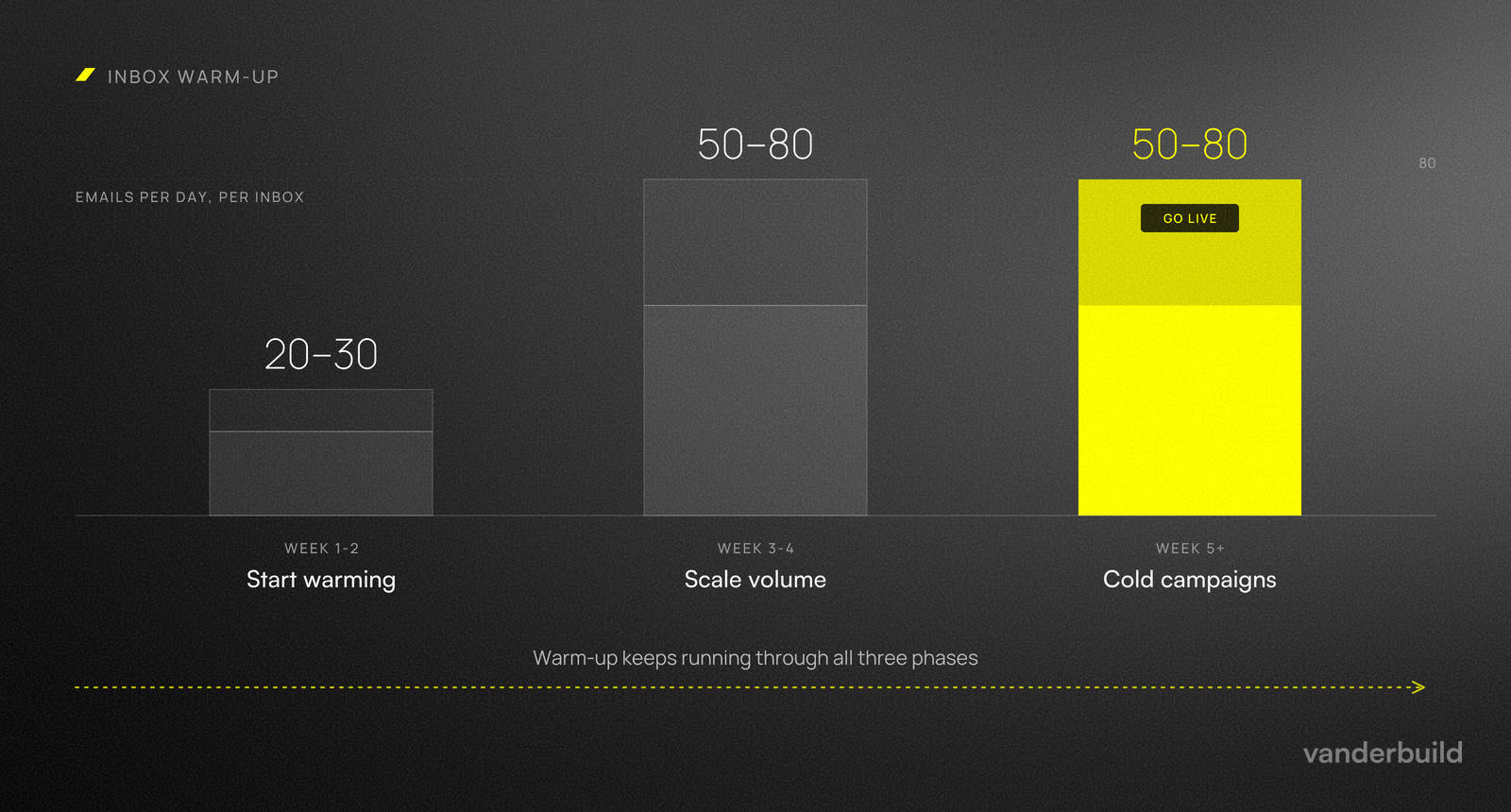
- Week 1-2: 20-30 emails per day, from real inboxes or via a warm-up tool
- Week 3-4: increase to 50-80 per day
- Week 5+: begin cold email campaigns, starting conservatively
Tools that handle this: Instantly, Smartlead, Lemlist, Mailreach, Warmup Inbox. Keep warm-up running even after you start sending campaigns - it continues to generate positive engagement signals that support your sender reputation.
Minimum warm-up before any cold sending: 3 to 4 weeks. There's no shortcut.
Sender Reputation
Inbox providers maintain a reputation score for your sending domain and IP address. This score directly influences whether your emails land in the inbox, go to spam, or are rejected entirely. It's not a one-time rating - it updates continuously based on your sending behavior.
Reputation is built by:
- Consistent sending patterns with no sudden volume spikes
- Low bounce rates (keep below 3%)
- Low spam complaint rates (Google flags domains with complaint rates above 0.1%)
- Positive engagement signals: opens, replies, "not spam" classifications
Reputation is damaged by:
- High bounce rates from invalid or unverified addresses
- Spam complaints from recipients
- Sudden sending volume spikes after periods of low activity
- Sending from unverified or poorly configured domains
Reputation damage is asymmetric. It takes weeks of clean behavior to build, and a single bad campaign can set you back significantly. Protect it by treating every campaign as a reputation event, not just a sending event.
List Quality and Bounce Management
Every hard bounce tells inbox providers you're not maintaining your list. High bounce rates - above 3-5% - signal that you're using unverified or purchased lists, which is a common characteristic of spam operations.
Best practices:
- Verify all email addresses before adding them to a campaign
- Remove bounced addresses immediately
- Never purchase email lists - they degrade rapidly and typically have high invalid rates
- Treat catch-all domains as high-risk: these domains accept all incoming emails at the server level, but the address you're sending to may not exist or be monitored. They appear valid during verification but often produce no engagement or silent drops.
Verification tools: Prospeo, Findymail, ZeroBounce, NeverBounce. Run every list through verification before any cold email campaign.
Content and Formatting
Spam filters analyze email content alongside technical signals. But even emails that pass spam filters can fail at the human level - opened, read for two seconds, and deleted.
Fix both layers.
Technical content rules (spam filter)
Common content-related deliverability issues:
- Spam trigger words: "free", "guaranteed", "limited time", "no risk", "act now"
- All-caps text or excessive punctuation
- Multiple links in a first cold email
- Heavy HTML formatting (spam filters prefer plain text or light HTML)
- Attachments - never include in cold emails
- Tracking pixels that differ significantly from your sending domain
The safest format for cold outreach: plain text or minimal HTML. Write as if you're sending from your personal email account, because that's exactly what inbox providers compare it against.
Copywriting rules (human filter)
Most cold emails that land in the inbox are good for only one thing: immediate deletion. A technically clean email still fails if the message doesn't resonate in the first two seconds.
Every email must instantly answer four questions for the recipient, in this order:
- Why are you writing to me specifically? (non-randomness)
- Why should I care? (an expensive problem)
- Why should I believe you? (proof)
- Why should I reply now? (low barrier)
Sell the superpower, not the tool. Companies write: "We offer an AI-powered CRM system." Nobody cares. Write instead: "We help SDR teams cut research time from 3 hours to 10 minutes a day." The first is a feature. The second is a promise of a result that removes real pain.
Find the expensive problem. If the problem you solve isn't painful, costly, and frequent, nobody replies. Look for the cost of inaction. "How do you currently prevent lead loss during sales rep turnover?" works far better than "I'd like to discuss optimization."
Be specific, not vague. "We help companies like yours grow" means nothing. Specific is credible. Vague is suspicious. Use numbers, time frames, and concrete process names. "We help SDR teams reduce research time from 3 hours to 10 minutes a day" can be visualized. "We improve your sales process" cannot.
Use the word "without." The promise of a result is good. The promise of a result without the accompanying pain is better. "Increase qualified demos without increasing headcount." "Reduce no-shows without turning your calendar upside down." This removes the decision burden from the recipient.
Make personalization count. One or two specific, accurate details per email are enough to differentiate from a template blast - a recent hire, a product launch, a funding stage, or a specific framing of the problem they're visibly dealing with. "I see you're recruiting 3 new sales reps - at this scale, teams often run into problem X" is personalization. "Great post on LinkedIn!" is noise.
Keep your CTA low-friction. Stop asking for "15 minutes next Tuesday" in the first email. That's a commitment. Your first email should only check for interest. "Is it worth exchanging a few thoughts on this?" or "Do you want me to send you more details?" gives the recipient an opening without pressure.
These are the essentials - the filters every cold email has to pass before it earns a reply. For the full framework, with ready-to-use templates, sequence structures, and breakdowns of what actually works in B2B outbound, see our Ultimate Cold Email Playbook.
Sending Behavior
How you send matters as much as what you send.
Volume limits: 30-50 emails per inbox per day maximum. Exceeding this is one of the fastest ways to trigger spam filters. If you need more volume, add more inboxes and domains - don't increase per-inbox load.
Consistent schedule: Send during business hours, on weekdays, with consistent daily patterns. Erratic sending behavior - 0 emails one day, 500 the next - raises flags with inbox providers. Treat your sending cadence as a signal of legitimacy.
Inbox rotation: Distribute sending across multiple inboxes and domains. This reduces per-inbox volume and protects individual domain reputation. Most modern cold email tools - Instantly, Smartlead, Lemlist - support inbox rotation natively.
Follow-up spacing: Space out your sequence steps. 3-4 days between the first and second email, 5-7 days between subsequent follow-ups. Sending too quickly increases complaint likelihood and creates patterns that filters recognize as aggressive automation. No more than 4-5 total touches per sequence.
Reply handling: Configure your sending tool to pause sequences automatically when a prospect replies. Sending a follow-up after receiving a reply is one of the fastest ways to generate a spam complaint.
Monitoring Deliverability
You can't fix what you don't measure. Most teams check reply rates. That's not enough.
Google Postmaster Tools: Free. Tracks domain reputation specifically for Gmail recipients. Essential if any significant portion of your list uses Gmail. A sudden drop in Gmail opens while Outlook opens stay stable is a reliable early signal of Gmail-specific deliverability issues.
Inbox placement testing: Tools like Glockapps or the built-in placement features in Smartlead and Instantly show where your emails are landing across different inbox providers. Run these before scaling any new campaign.
Blacklist monitoring: Check MXToolbox or similar tools regularly for domain and IP blacklistings. Being blacklisted can silently kill deliverability with no warning in campaign metrics.
Bounce and complaint tracking: Your sending platform should report these per campaign. Bounce rate above 3% is a warning sign. Above 5% is a serious problem that will damage domain reputation quickly.
Monitoring deliverability
What to track, and where it shows up first
Reply rate is the last number to move. By the time it drops, the damage is a few weeks old. These five show up earlier.
-
01
Gmail domain reputation
ToolGoogle Postmaster ToolsFree
Signal to watchThe rating sliding from High to Medium. It moves weeks before reply rates do, and it is the only place Gmail tells you directly.
-
02
Inbox placement
When to run itAcross providers before scaling a campaign. Running it after the numbers slip tells you what already happened.
-
03
Blacklist status
ToolMXToolbox or similar, on both the domain and the sending IP.
Why it mattersA listing kills delivery with nothing showing in campaign metrics. Sends still report as sent.
-
04
Bounce rate
SourcePer-campaign reports inside your sending platform.
ThresholdsOver 3% means the list needs verifying. Over 5% damages domain reputation within days.
-
05
Spam complaint rate
SourceGoogle Postmaster Tools, plus whatever your platform reports.
ThresholdsA different order of magnitude from bounces. Keep it under 0.1%. At 0.3% Gmail and Yahoo start filtering you as a matter of policy.
The Smartlead and Instantly links are affiliate links. Complaint-rate thresholds follow the bulk sender requirements published by Google and Yahoo.
Common Deliverability Mistakes
Sending from your main domain
If your cold email domain's reputation is damaged, it can affect your main domain too if they share sending infrastructure. Always use a dedicated cold outreach domain.
Skipping warm-up
New domains that immediately send at volume are flagged. Minimum 3-4 weeks of warm-up before any real campaign sends.
Using purchased or unverified lists
Purchased lists have high invalid rates, produce high bounce rates, and include spam trap addresses. Unverified lists have the same problems at lower intensity. Verify before sending, every time.
Ignoring DMARC
Setting DMARC to none and never revisiting it means you have no enforcement and no visibility into domain abuse. Move to quarantine once you've confirmed all legitimate sending sources are authenticated.
Not monitoring reputation
Teams that only check reply rates miss deliverability degradation until it's severe. Check inbox placement and domain reputation regularly - not just when results drop.
Confusing "spam folder" with "deleted from inbox"
These require different fixes. Spam folder problems are technical - authentication, reputation, content signals. Deleted-from-inbox problems are copy and relevance problems - wrong message, wrong framing, wrong CTA. Diagnose which problem you have before deciding what to fix.
Before you send
Five checks, and the four that stop everything
Run these before the first campaign goes out. Four of them are not scored against the others: if any one is true, nothing else on the list matters yet.
| Check | What good looks like | Stop and fix |
|---|---|---|
| DNS authentication | SPF, DKIM and DMARC set on every sending domain, not only the main one. | None of the three. The fastest route to the spam folder, and the cheapest thing on this list to fix. |
| Sending domain | Separate domains and inboxes bought for outbound, pointing back at the main site. | The main brand domain. One bad campaign takes your invoices and support replies down with it. |
| Domain age | Six months or more. An older domain absorbs mistakes a new one does not. | Under 30 days is not a dealbreaker, but treat every send that month as part of the warm-up. |
| Warm-up | Four weeks before the first real send, and it keeps running afterwards. | No warm-up at all. The domain gets flagged at the first real volume, whatever the copy says. |
| Daily volume | Up to 30 per inbox. Need more reach? Add inboxes, not messages per inbox. | Above 50 per inbox. Between 31 and 50 works but leaves no margin for a bad list. |
These do not average out. Perfect DNS, a six-month domain and four weeks of warm-up count for nothing if the campaign sends from your main domain. Clear the right-hand column first, then worry about the rest.
Have someone check the setupThe Relationship Between Deliverability and Results
Deliverability doesn't guarantee replies. But poor deliverability makes good results impossible.
A campaign with 50% inbox placement is working at half capacity. Fix deliverability first - it's the prerequisite for everything else.
Once your emails are landing in the inbox reliably, the next constraint is the message itself. If your open rates are healthy but reply rates are low, the technical layer is working - and the copy layer needs attention.
If you're troubleshooting a campaign with low open rates or unexpected reply rate drops, start with deliverability. Check your authentication records, bounce rates, and inbox placement. In most cases, the problem is technical, not copy.
Frequently Asked Questions
What's the difference between email delivery and deliverability?
Delivery means the receiving server accepted the email. Deliverability means it reached the inbox rather than spam. You can have 100% delivery and poor deliverability if emails are consistently classified as spam.
How long does it take to warm up a new domain?
Minimum 3-4 weeks of gradual warm-up before sending cold email campaigns at volume. Some practitioners warm up for 6-8 weeks before scaling. There's no shortcut.
What bounce rate should I be concerned about?
Above 3% is a warning sign. Above 5% is a serious problem that will damage domain reputation. Keep bounce rates low by verifying all email addresses before campaigns.
How do I know if my emails are going to spam?
Use Google Postmaster Tools for Gmail-specific data. Run inbox placement tests through Glockapps or your sending platform. Monitor open rates by email client - a sudden drop in Gmail opens while Outlook opens remain stable often indicates a Gmail-specific deliverability issue.
Do I need a separate domain for cold outreach?
Yes. Always. A damaged cold email domain reputation should not be able to affect your main brand domain. The cost of registering an additional domain is trivial compared to the risk.
My emails reach the inbox but still get ignored. What's wrong?
That's a copy problem, not a deliverability problem. The most common causes: the email doesn't answer "why me, why now", the offer is framed around features instead of outcomes, the CTA asks for too much too soon, or the personalization is generic. Start by checking whether your email answers all four recipient questions - non-randomness, expensive problem, proof, and low barrier to reply.
What's a realistic reply rate for cold email?
Anything below 1-2% typically signals that the message doesn't hit an expensive problem or reads like generic spam. Well-structured campaigns with real personalization and a sharp problem framing regularly achieve 5-10% reply rates. Advanced personalization based on specific research - not just a name - can push response rates from 7% to 17%.
Setting up outbound from scratch? Read: How to Create an Effective Cold Email Campaign